Home / Products / Conference Systems / Paperless Conference System Client Software V3.0 TS-8304R1
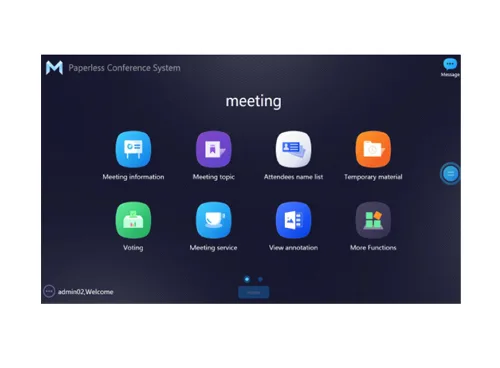
Paperless Conference System Client Software V3.0 TS-8304R1

Paperless Conference System Client Software V3.0 TS-8304R1

Paperless Conference System Client Software V3.0 TS-8304R1
Conference Systems · Paperless Conference

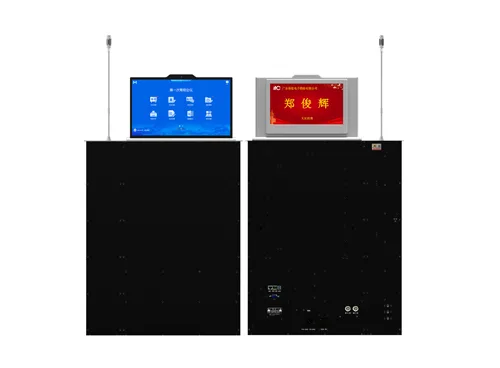
The client software of paperless conference system supports in-conference file push, file distribution, browsing and reading, file annotation, sign-in, voting and scoring, conference minutes, electronic whiteboard, electronic nameplate, conference communication, conference service, video signal interconnection, conference management, screen sharing, large-screen video matrix, large-screen VOD and other applications. Working with a paperless lift, it can be applied to various high-end conference occasions, as well as important government affairs, business, enterprises and institutions and large-scale event venues.

Features

  • The software runs on the Windows operating system and adopts a C/S architecture. It has functions such as file push, file distribution, browsing and reading, file annotation, smart sign-in, voting and scoring, meeting minutes, electronic whiteboard, electronic nameplate, conference communication, conference service, video signal interconnection, conference control, same-screen broadcasting, large-screen video matrix, and large-screen on-demand.
  • The national secret SM2 and SM4 national secret encryption algorithms are used to encrypt data files and keep them encrypted during transmission. They can be decrypted, displayed, read, and annotated through paperless client software to ensure the security of conference data.
  • It has multiple conference modes, including normal mode and confidential conference mode. After the confidential conference mode is enabled, you can customize anti- screenshot (Android paperless), participant file watermarks, and file reading and burning mechanisms to ensure the security of conference files.
  • The user software is installed on each terminal and has the necessary meeting functions such as meeting agenda, materials, voting, etc., and has English/Chinese/ Mongolian language as options.
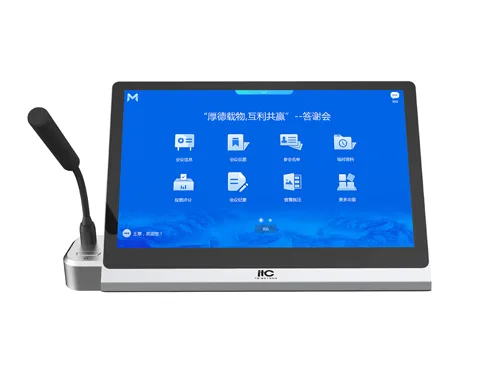
  • It has the function of switching the client conference layout mode, and can switch 4 different layout modes according to user needs, including card mode, introduction mode, navigation mode, and classic mode; card mode, the topic is presented on the homepage in the form of cards, and all topics (including the agenda) can be viewed on the homepage by sliding horizontally; simple mode: the agenda is presented on the homepage in the form of a program list, and can be viewed by sliding vertically; navigation mode: the homepage interface has a navigation directory, and the corresponding function list check-in, voting, scoring, minutes, and video content are displayed at the same time; classic mode, click the corresponding function module, enter the function details interface in a hierarchical manner, and display the corresponding function-related viewing and operation content.
  • It has the function of selecting broadcast/lecture mode, including free mode, application mode, and autonomous mode; in free mode, when the user initiates screen broadcast/lecture, no other operation is required, and the screen broadcast/lecture function can be entered with one click; in application mode, when the user initiates screen broadcast/lecture, it is necessary to wait for the administrator to confirm the management configuration before entering the screen broadcast/lecture function; in autonomous mode, when the user initiates screen broadcast/lecture, the person who can view the same screen broadcast can be selected; it supports broadcast timing function, which can switch between no timing mode, positive timing mode, and countdown mode, and the countdown time can be set.
  • It has the function of scanning code files and taking them away, and the function of generating QR codes for conference materials. According to the attributes of the meeting, it can control the display of QR code projection for participants to scan the code and download the conference materials.
  • It supports the conference information display page, and can directly view the conference agenda, conference introduction, conference host and other information.
  • Support document reading, can read a variety of file formats, including common formats doc/docx/xls/xlsx/ppt/pptx/pdf/txt/jpg/png, etc., support permission setting function, participants can only see the files they have permission to view; with double-finger zoom in and out document reading function.
  • Support viewing the list of participants and the seating chart of the meeting personnel, support zoom in/out to view the seating chart.
  • Support document annotation function, support common document formats (doc/docx/xls/xlsx/ppt/pptx/pdf/png/jpg), can annotate and re-annotate and save document images, and support multi-person interactive annotation.
  • Support U disk to upload multiple meeting materials, read files or upload to share with other participants, and the uploaded files can be saved in the server and local terminal.
  • With the function of scanning code to upload materials, support mobile terminals to directly upload files, videos and other meeting materials by scanning QR codes.
  • Support electronic whiteboard function, which can be a local whiteboard or a multi-person interactive whiteboard. The electronic whiteboard supports inserting background images, drawing graphics, text input, line width adjustment, brush color adjustment, stroke erasing, one-key clearing, undo and restore, etc.
  • Support conference communication, participants can communicate with one or more people in real time.
  • Support screenshot annotation, which can be annotated by one person or multiple people. Support graphic drawing, text input, line width adjustment, brush color adjustment, stroke erasing, one-key clearing, undo and restore, etc. The annotation results can be saved to the server and automatically archived after the meeting.
  • Support paperless meeting mode and ordinary computer mode, and can switch modes at will during the meeting.
  • You can call the conference service during the meeting, and the options include tea, pen, paper, etc. You can also customize the input service requirements; after the call, the waiting status will be displayed, and the status will be displayed as completed after the logistics service personnel complete the processing; if the user does not need the service, the call can be canceled.

Request a quote for this product